Not Right Now subscriber access
We’re moving our podcast hosting all over to beehiiv.
This means you’ll need to reset up the private feeds for the Member editions of the shows in your podcast app.It should only take 2 minutes!
To continue receiving the member editions (ad-free everything and bonus content) of Not Right Now please follow the below instructions:
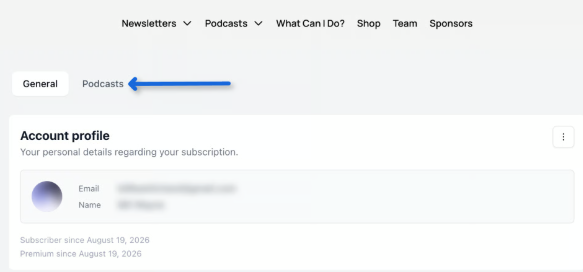
First click here to go to your subscriber profile and click on “Podcasts”.
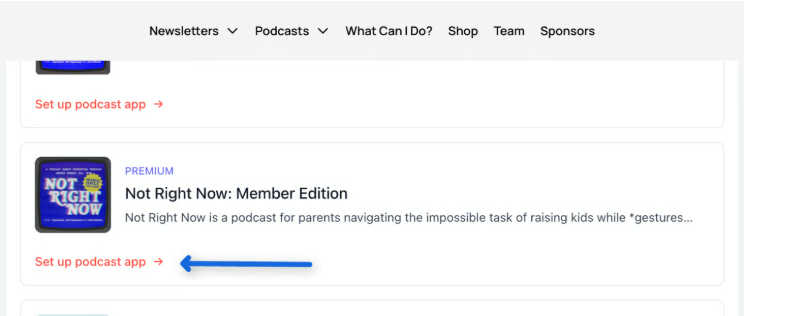
On the next page, scroll down and select the “Set up podcast app” link for the Member edition of the show you want to add.
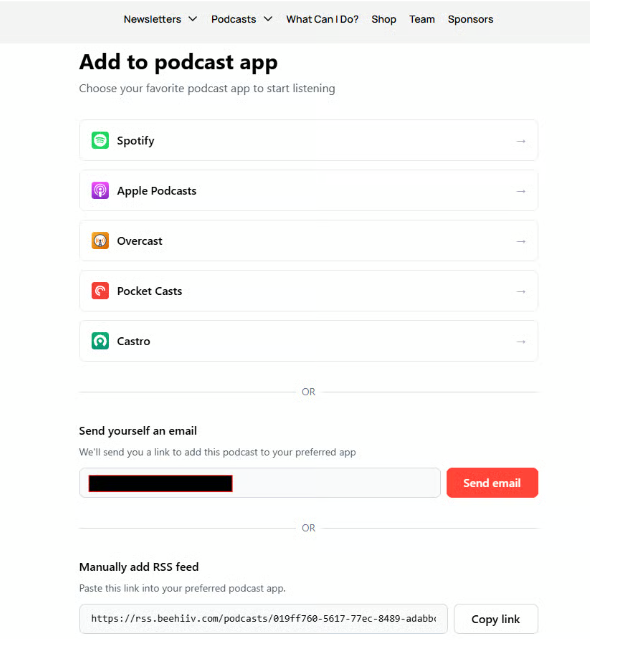
On the following page, you can either select your preferred podcast provider to scan a QR code with your mobile device, receive an email with a link to paste into your favorite podcast app, or copy the feed link manually to paste into your favorite podcast app.
Important: If you’re already subscribed to our old member feed, we’ve changed the name of that feed to make it easier to find it and unsubscribe. It has now been renamed “(Old feed, please unsubscribe) Not Right Now: Member Edition.” |
That’s it! |
Important: If you’re already subscribed to our old member feed we’ve changed the name of that feed to make it easier to find it and unsubscribe. It has now been renamed “ (Old feed, please unsubscribe) Not Right Now: Member Edition.”
That’s it! We’ve tried to make this transition as smooth and pain-free as possible for you. Please don’t hesitate to reach out to Willow Beck at willow@importantnotimportant.com if you have any questions.